add new line after every end of file's contents while merging multiple files

1

I have written shell script to merge different file's contents I have created directories f1,f2,d1,d2 and files under them , I need to merge all files's contents : comand is

(find /home/ah5024331/f1 /home/ah5024331/f2  /home/ah5024331/d1  /home/ah5024331/d2 /home/ah5024331/f1 /home/ah5024331/f2  -type f | xargs -i cat {} ) > t.txt

output is :

--this is new text from f1 ----
--this is text from f2 ------this is new text from d1 ------this is new text from d2 -----this is new text from f1 ----

I need to add new line after every end of file like:

--this is new text from f1 ----
--this is text from f2
------this is new text from d1 
------this is new text from d2 
-----this is new text from f1 ----

How to do that?

Any help would be appreciated in advance.

user

Posted 2015-06-22T12:41:30.070

Reputation: 199

Answers

0

Try this:

#!/bin/bash
for f in $(find /home/ah5024331/f1 /home/ah5024331/f2 \
    /home/ah5024331/d1 /home/ah5024331/d2 -type f)
do
    cat "$f" >> t.txt
    echo >> t.txt
done

This will append a new-line after the end of each file, however, if any of these files already have a new-line at the end, you'll see an extra blank line in the output (as mentioned by @mnmnc in comments).

jweyrich

Posted 2015-06-22T12:41:30.070

Reputation: 1 106

Why echo "FOOBAR" >> t.txt and not just echo >> t.txt? – Arkadiusz Drabczyk – 2015-06-22T12:58:40.770

Will not work with some files that already have a \n at the end. This will create a double new line in some cases. To make it work perfectly you would have to remember last char placed in output and verify on switching to next file i think. – mnmnc – 2015-06-22T12:59:03.833

From what I see she asked: I need to add new line after every end of file like (...) – Arkadiusz Drabczyk – 2015-06-22T13:01:47.147

@ArkadiuszDrabczyk ops, I misread the question. I'll simplify it as you suggested. Thanks for bringing this up. – jweyrich – 2015-06-22T13:02:10.997

I tried code its not adding new line after every file – user – 2015-06-22T13:33:08.350

0

Create a dummy file with a newline.

echo -n "" > /tmp/newline.txt

Now execute your script as below.

(find /home/ah5024331/f1 /home/ah5024331/f2  /home/ah5024331/d1  /home/ah5024331/d2 /home/ah5024331/f1 /home/ah5024331/f2  -type f | xargs -i cat {} /tmp/newline.txt ) > t.txt

sureshraju

Posted 2015-06-22T12:41:30.070

Reputation: 141

It is not adding new line – user – 2015-06-23T06:34:04.263

Which Unix OS you are running this script. Remove -n option and try again. Can u paste that output so that we will have some better picture. – sureshraju – 2015-06-23T12:09:38.673

0

Using GNU Parallel it looks like this:

(find ...  -type f | parallel -j1 cat {}';'echo ) > t.txt

GNU Parallel is a general parallelizer and makes is easy to run jobs in parallel on the same machine or on multiple machines you have ssh access to. And it can also replace many for loops as in this case.

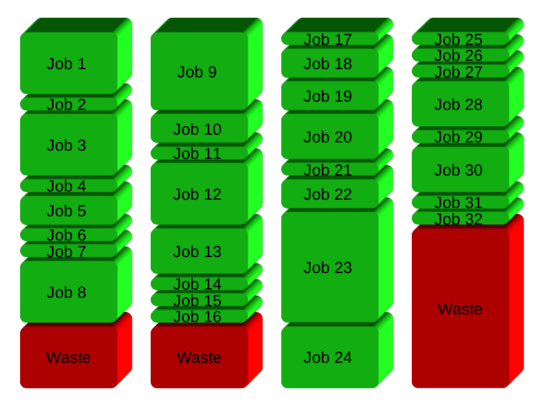
If you have 32 different jobs you want to run on 4 CPUs, a straight forward way to parallelize is to run 8 jobs on each CPU:

Simple scheduling

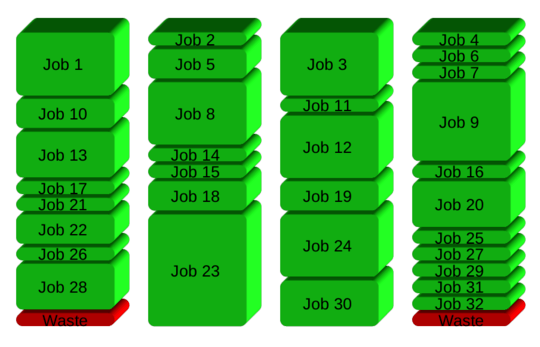
GNU Parallel instead spawns a new process when one finishes - keeping the CPUs active and thus saving time:

GNU Parallel scheduling

Installation

If GNU Parallel is not packaged for your distribution, you can do a personal installation, which does not require root access. It can be done in 10 seconds by doing this:

(wget -O - pi.dk/3 || curl pi.dk/3/ || fetch -o - http://pi.dk/3) | bash

For other installation options see http://git.savannah.gnu.org/cgit/parallel.git/tree/README

Learn more

See more examples: http://www.gnu.org/software/parallel/man.html

Watch the intro videos: https://www.youtube.com/playlist?list=PL284C9FF2488BC6D1

Walk through the tutorial: http://www.gnu.org/software/parallel/parallel_tutorial.html

Sign up for the email list to get support: https://lists.gnu.org/mailman/listinfo/parallel

Ole Tange

Posted 2015-06-22T12:41:30.070

Reputation: 3 034