16
6
Well, I have setup a VM in Virtual Box in a PC (label as PC2), and I have hosted a web service in the VM (IIS).
PC2 - Windows Server 2003 VM - Windows 7 x86
Now I want to access the web services from another PC (label as PC1) within a network that PC1 has connected. The following diagram will be helpful to get a clear idea.
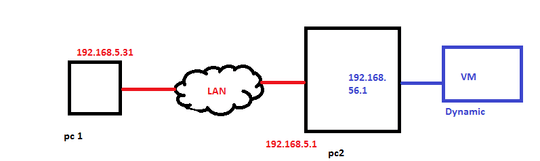
So the LAN is 192.168.5.0. But virtual network ports IP is 192.168.56.1 by default. In the VM, its IP from DHCP by default. (ipconfig gives you IP address like 10.0.0.2.15, subnet mask 255.255.255.0 and gateway as 10.0.2.2).
At this point, I can ping PC1 (192.168.5.31) from VM (10.0.2.15), but I cannot ping 10.0.2.15 from PC 1. Even if I make VM and PC2 virtual ports IPs to some static range, from VM, I can't ping any IP.
How to solve this situation? Thanks in advance

Tharik Kanaka
Posted 2012-11-26T08:26:33.980
Reputation: 295


I searched the internet for hours, finally found this answer. Sometimes RTFM saves your time actually. Thank you! – user1641838 – 2018-10-09T02:45:11.603
Pertaining to the host-only networking solution, can someone explain in more detail how this works, and how to route it through? – scoots – 2018-11-12T23:42:05.587
thanks i sorted it out by making it as Adapter and restarted the VM – Tharik Kanaka – 2012-11-27T14:27:42.333